CNalytics · Clinical Dental AI
TMJ Analysis
Upload a CT scan and AI automatically segments the bilateral TMJ condyles and fossae, quantitatively analyzes joint space (AJS/SJS/PJS) and condylar volume, and measures left-right asymmetry for TMJ disorder diagnosis.
- Automatic bilateral condyle-fossa segmentation & 3D visualization
- Quantitative AJS/SJS/PJS joint space analysis
- Automatic asymmetry measurement with normal/abnormal classification
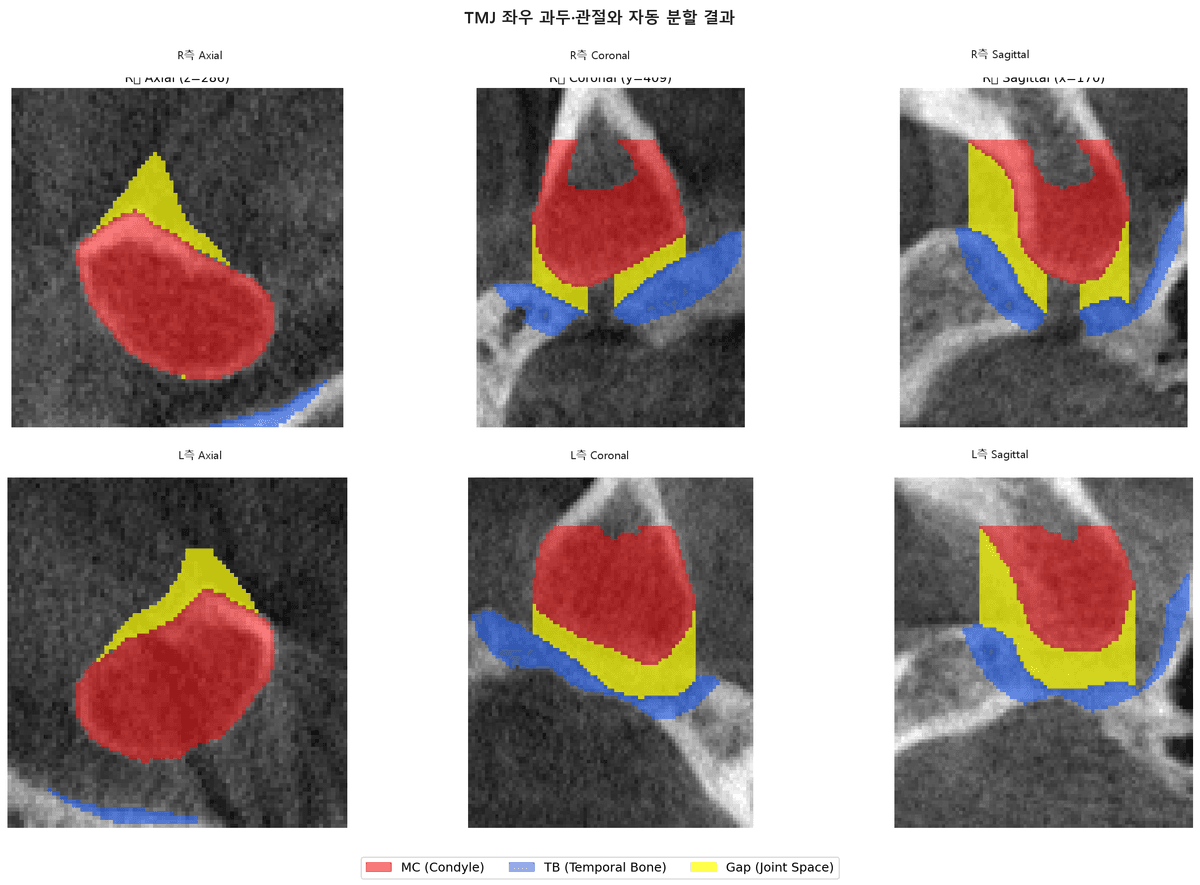
CNalytics TMJ Analysis lets AI automatically segment the bilateral TMJ condyles and fossae from a CT scan and quantitatively analyze joint space and condylar volume. CNalytics automatically measures AJS/SJS/PJS joint spaces and left-right asymmetry to support TMJ disorder (TMD) diagnosis.
How to use
- Step 1
Upload CT
Upload CT/CBCT data that includes the temporomandibular joints to CNalytics.
- Step 2
Auto condyle segmentation
AI segments the bilateral condyles and fossae and visualizes them in 3D.
- Step 3
Joint space · asymmetry analysis
Quantifies AJS/SJS/PJS joint spaces, condylar volume, and left-right asymmetry.
Frequently asked questions
The most common questions before getting started with CNalytics